Chart Settings - Miscellanea
The Chart Settings window consists of several thematic tabs of options for calculating and displaying horoscope charts. The Miscellanea tab contains new additional options and settings.
The Chart Settings - Miscellanea tab is opened by first:
- selecting "Settings" | "Chart Settings" from the main menu, or
- clicking the
 "Options" Toolbar button
and selecting "Chart Settings..." from the menu, or
"Options" Toolbar button
and selecting "Chart Settings..." from the menu, or
- right-clicking in the Chart tableau and selecting "Chart Settings..." from the popup menu, or
- double-clicking in an empty region of the Chart tableau.
Then by clicking the  "Misc." button
at the top of the window, or typing the 'M' key.
"Misc." button
at the top of the window, or typing the 'M' key.
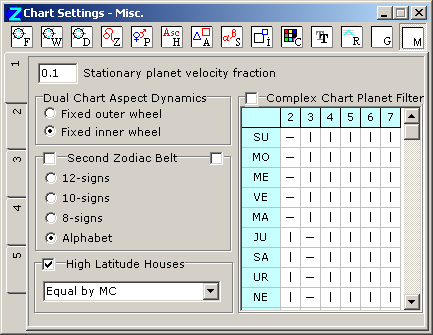
The settings are contained on two sub-tabs, selected by clicking the vertical tabs at left of the window.
High Latitude Houses- When the geographical latitude of the event data is north of 67 degrees or
south of -67 degrees, some houses systems (e.g. Placidus) do not work
properly. In such cases, if this option is checkmarked, ZET will switch automatically
to using the house system you selected from the drop-down listbox, e.g. 'Equal by MC'.
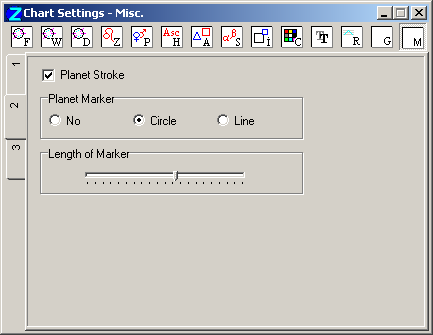
-
This option displays lines, which connects planet's glyph with appropriate
planet's marker at a chart.
-
These options allow the use of index marks on the inside of the
planet ring(s) of the chart wheel to indicate the exact position of planets. This may be
found useful with dual/complex charts where one of the
Use circular glyph shifting options has been set (see Wheel tab).
The options are:
- No index marks,
- Circle index marks,
- Line index marks.
The Length of Marker slider allows you to adjust the length of the marker, if you have selected the "Line" option above.
The colors of the index marks can be set individually for the core and background planet data sets on the Color tab.
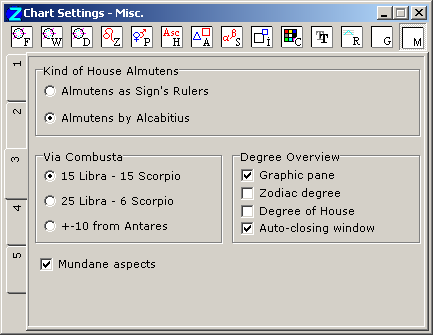
- Choose one kind of house almutens calculation:
- Almuten is a ruler of Sign on a cusp of this House.
- Almuten by Alcabitius.
-
See Chart Settings, Data, Almuten of house.
- Choose one kind of the "Via Combusta" description:
- 15 Libra - 15 Scorpio.
- 25 Libra - 6 Scorpio.
- +-10 from Antares.
(This option enabled only fo Geo version)
The "Mundane aspects" based on a function to compute the house position of a given body, i.e. in which house it is (so called "Mundane Zodiac", in which all houses are stretched or shortened to a size of 30 degrees.). E.g. the mundane aspect between the planet in 15th degree of 1st house and the palnet in 15th degree of 3rd house - is always sextil, independently of distance between these planets in normal ecliptic Zodiac.If consider the mundane aspects in a dual chart, then e.g. conjunction takes a place not with visual imposition of two planets, but when they located in the same degree of same house. E.g. natal Saturn in 19th degree of 8th natal house, transiting Mercury in 19th degree of 8th transit house. This is a mundane conjunction in spite of the fact than the natal Saturn and transit Mercury are located in other signs.
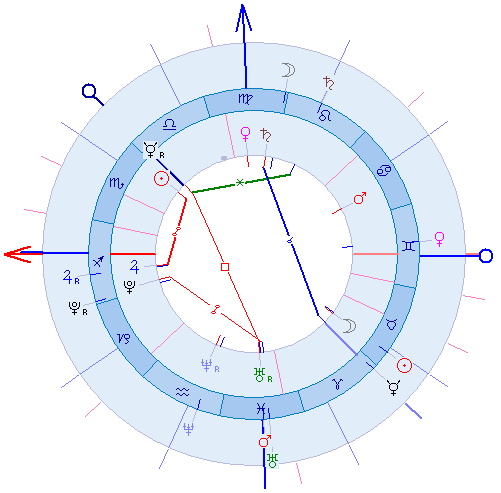
The value of house position of planets is possible to display in coordinate table, if in additional data (chart settings, data) to switch on the "Mundane position" option (as for inner, as for outher rings). The value of house position is between 1.0 and 12.999999, indicating in which house a planet is and how far from its cusp it is.
The mundane position differ from "House Degree", which displays in additional data separatelly.
Note: some program's functions not consider the "Mundane aspects" option or not compatible with it, so be carefull with using it.
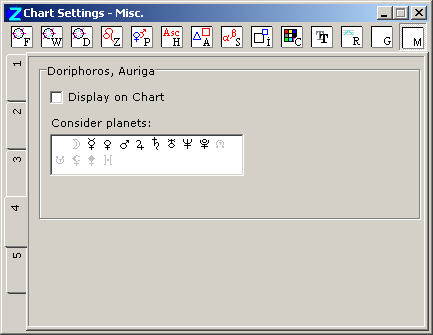
There is an option of displaying "Doriphoros" and "Auriga" planets on a chart, and possibility to setup any set of planets, recognised as Doriphoros and Auriga (also used in astro-formulae calculation).
Doriphoros (doryphory) the planet rises directly before Sun. Auriga: the planet sets directly before Sun.
To select a planet click it's glyph by mouse. Selected one is black, unselected is gray.
Tab 5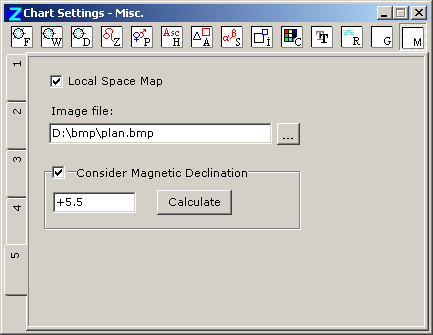
This function is not availabel in Lite version.
The "Local Space Map" function as a variant of the Local Space Astrology for nearest surroundings, e.g. apartment, city, and so on. The function bases at the image of an apartment's draft (or city map). See Local Space Map of Astrocartography chapter.
The "Local Space Map" flag switches on displaying of the appropriate map.
In the "Image file" field it need to specify the path to the image-file of chart.
The "Consider Magnetic Declination" option should checked on if you use the magnetic compass for orientation.
The compass points in the directions of the horizontal component of the magnetic field where the compass is located, and not to any single point. Knowing the magnetic declination angle between true north and the horizontal trace of the magnetic field for your location allows you to correct your compass for the magnetic field in your area. A mile or two away the magnetic declination may be considerably different, requiring a different correction.
To get a value of magnetic declination click the "Calculate" button and follow NGDC on-line magnetic declination calculator where you can enter your location (or zip code for the USA). Remember: east declination is positive, west negative.