 ZET - Astrolgy Software
ZET 8 Professional
| Home | News | ZET features | Downloads | Manual 9 | Manual 8 | Registration |
To install ZET 8 Professional to your computer:
- Install your registration key
- Install the professional installer
- Install the topographical map (for Geo modification).
1. Install ZET 8 Pro or Geo key
Unlike ZET 8 Lite, for professional ZET versionns needs a registration key, you received it by email while registration. This key is differ for Pro and Geo.
The key is a file named "YourName_8Pro.exe" or "YourName_8Geo.exe".
You received a link to this file by email while registration. You should download and save this file.
Installing a key means open (run) file of key at your computer, after this an appropriate information will writed to Windows registry. This action fillfulled one-time-only while first installation of professional ZET. To install a key you should know a key's password, which you received by email too while registration.
To install your registration key you can do following steps:
- Open the key-file (e.g. by double-clicking the file icon).
There appears the "Enter password" window.
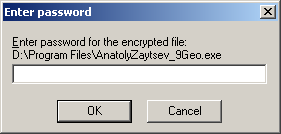
- Input requested "password for key" which you know.
- Click "OK" button. Will flash a small black window, it's right.
It will need to install a key again in cases of reinstallation a Windows system in your computer, or installation ZET in another computer.
2. ZET 8 professional installer
You can setup a ZET 8 professional installer, contains ZET 8 Professional and all additional components, including World Atlas II (contains 200 000 cities), Big Atlases of several countries, hight resolution Geographical Maps with shoreline, rivers and administrative borders. To do that:
- Download the installer (the link was reported to you in registration message).
- Open (run) this file. Follow the dialog.
- No need to read information part, it's only for CD installation. You should only specify a path to folder, where you wish install a program. By default this is "C:\Program Files\ZET 8\"
- Take into account, if you just installed some updates more newest, then professional installer, then you should setup these updates again manually.
3. Topographical Map
For ZET 8 Geo the topographical map is accessable. If you have 3.5 GB of hard disk free space, you can setup a topographical (relief) map (it is optional: basic functions of ZET will not suffer whithout it).
To install the topographical (relief) map, do following:
- Download the Toppgraphical Map installer (the link was reported to you in registration message).
- Open this file. When a dialog appears, specify a path to main ZET folder, e.g., "C:\Program Files\ZET 8\", click "Install" button.
- Run ZET, click "Settings", "Geographical Map Settings", check on a "Relief (topographical)" option.
| Home | News | ZET features | Downloads | Manual 9 | Manual 8 | Registration |