Chart Settings - Zodiac
The Chart Settings window consists of several thematic tabs of options for calculating and displaying horoscope charts. The Zodiac tab contains options for selecting a zodiac, a viewpoint, and the projection method for deriving the coordinates of bodies. Harmonic chart options are also set here.
The Chart Settings - Zodiac tab is opened by first:
- selecting "Settings" | "Chart Settings" from the main menu, or
- clicking the
 "Options" Toolbar button
and selecting "Chart Settings..." from the menu, or
"Options" Toolbar button
and selecting "Chart Settings..." from the menu, or
- right-clicking in the Chart tableau and selecting "Chart Settings..." from the popup menu, or
- double-clicking in an empty region of the Chart tableau.
Then by clicking the  "Zodiac" button
at the top of the window, or typing the 'Z' key.
"Zodiac" button
at the top of the window, or typing the 'Z' key.
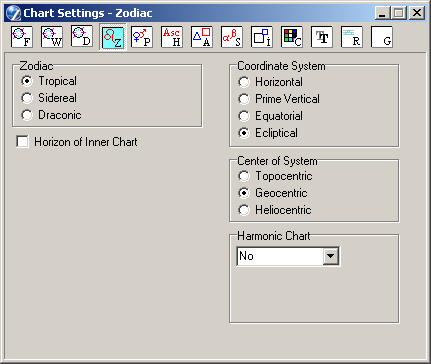
- This panel allows you to set the zodiac. The rings of dual/complex charts use
the same zodiac.
- Tropical - western, astronomical Zodiac - 0° is the vernal point, the intersection of equator and ecliptic,
- Sidereal - eastern, Indian Zodiac - using ayanamsa. This option makes several further settings available (see below),
- Draconic - origin is the intersection of the ecliptic and the Moon's orbit, i.e. Moon's ascending Node.
- This setting is for use with the Horizontal and Prime Vertical coordinate systems
(see below). When set, the background (outer ring) planets are
projected to the core (inner ring) plane, rather than the background plane.
-
This panel allows you to select between various options for setting the
reference plane and obtaining the coordinates of planets, etc:
- Horizontal - also called Azimuth system. The chart wheel is a projection of the planets onto the terrestrial horizon. 'Signs' and 'houses' are identical, consisting of 12 equal divisions from east thru north, west, and south,
- Prime Vertical - the chart wheel is a projection of the planets onto a vertical plane defined by the points: east, nadir, west, zenith,
- Equatorial - the main plane is the celestial equator; the origin is the vernal point,
- Ecliptical - the standard astrological system, using the ecliptic.
- This panel allows you to select betweeen various options for setting the
effective location of the center of the chart wheel, i.e. the viewpoint
for the chart:
- Topocentric - referenced to the current location on the surface of the Earth (real position of native),
- Geocentric - referenced to the center of Earth. This is the most commonly used choice in astrology,
- Heliocentric - referenced to the center of the Sun, the Earth then appearing in the horoscope as a planet. (This option affects only the natal chart and Aspects Grid; the Sky tableau, for example, remains geocentric).
- This panel allows you to create a harmonic chart for any number by selecting a
harmonic factor. Commonly-used factors are predefined in the
drop-down list - the chart is created instantly. This is a specialist astrological tool.
- Selecting the "-User-defined-" option in the drop-down list makes available an entryfield adjacent the list box to input a factor. The harmonic factor entered here does not have to be an integer, it can be decimal e.g. 3.1415... The harmonic chart is automatically computed on typing in this field.
- Retain 1H Planets List - when checkmarked, the real (i.e. 1st harmonic) coordinates of planets are displayed in the planets list and in planets' info tooltips. When unchecked the planets' listing and tooltips display coordinates calculated for the selected harmonic factor.
- Equal Asc Houses - when checked, the natal ascendant is included in the calculation,
and the harmonic chart is erected using an Equal House system based on the harmonic ascendant.
The wheel retains the 'East Point' of the 1st harmonic (natal) chart.
When unchecked, the wheel retains the natal house
longitudes, i.e. only planets' positions are adjusted according to the harmonic calculation.
There is a special operational dialog for inputting the harmonic, which can be invoked with the Alt+H hot-key - the chart is redrawn synchronously. If the harmonic number have more than one digit, enter it quickly, with no more 0.5 second intervals.
- This panel is displayed only if the Sidereal zodiac type has been selected in the Zodiac
panel.
- Type of Ayanamsa The drop-down list allows selection of different methods
of calculating the ayanamsa. It is possible to select one of several predefined types of
ayanamsas:
- Lahiri,
- Fagan,
- Raman,
- Krishnamurti,
or to define a custom one. If the "-User-defined-" option is selected, two further entryfields become available: - Ayanamsa 2000.0 - input your preferred value for Epoch 2000.0,
- Speed of Precession ("/year) - input the rate of precession, in arc-seconds per year,
- True Precession - when checked, the speed of precession is set to an established astronomical value. Uncheck this setting to input a different speed of precession.
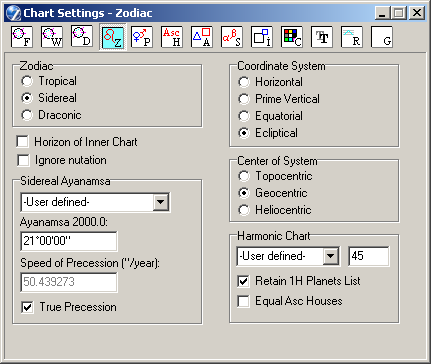
- This option is displayed if the Sidereal or Draconic zodiac is selected.
When unchecked (the default), calculation of the sidereal ayanamsa factors in the
longitudinal nutation of the ecliptic (short-term oscillations of the Earth's orbit).
Some astrologers, however, do not take nutation into account; in this case
the option may be checkmarked.