Chart Settings - Format
The Chart Settings window consists of several thematic tabs of options for calculating and displaying horoscope charts. The Format tab contains options for configuring the Chart tableau.
The Chart Settings - Format tab is opened by first:
- selecting "Settings" | "Chart Settings" from the main menu, or
- clicking the
 "Options" Toolbar button and selecting "Chart Settings..." from the menu, or
- right-clicking in the Chart tableau and selecting "Chart Settings..." from the popup menu, or
- double-clicking in an empty region of the Chart tableau,
Then by clicking the  "Format" button at the top of the window,
or typing the 'F' key.
"Format" button at the top of the window,
or typing the 'F' key.
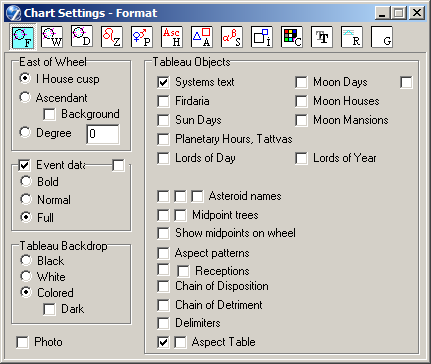
- This panel allows you to set the 'East Point' (horizon) of the chart wheel
(see also the Direction of Houses setting on the Wheel tab).
- I House cusp - selects the cusp of the first house of the core data (inner wheel). In many houses systems, but not all, this coincides with the Ascendant,
- Ascendant - selects the Ascendant of the core data (i.e. inner wheel). This is the most common setting,
- Background Asc - selects the Ascendant of the background data (e.g. outer wheel of dual charts),
- Degree - selects the degree of the Zodiac entered in the adjacent entryfield (whole numbers only). This anchors the 'East Point' of the wheel to a constant degree of zodiacal longitude (e.g. when set to '0', to the First Point of Aries), for situations in which houses are not important, or if it is required to pin the chart wheel prior to rotating the chart.
- The options in this panel allow you to select alternative display formats for the event
(birth) details at top left of the Chart tableau.
- The settings here select a general framework for coloring the elements of the Chart tableau.
- Black - sets a black backdrop. Alternative colors are used, as defined for a black background. By default white is used for zodiac signs and inner ring planets, blue for outer ring planets. The defaults can be overridden by selecting your own colors for planets and aspects for use with a black tableau background,
- White - sets a white backdrop. Chart elements are colored as for the Color background option. By default black is used for inner ring planets, blue for outer ring planets. The defaults can be overriden by selecting your own colors as for the Color option,
- Color - enables coloring of tableau elements to be fully adjusted using the Planets tab, orb tables, and Color tab settings,
- Dark - used with the Color setting. When checked, dark colored aspect
lines are shown as white. Also some other
colored elements depend on this setting.
To set the colors of specific tableau elements, use the Chart Settings - Color tab.
- Systems text
Displays the Zodiac type, house system, and coordinates systems used to cast the chart (for reference). - Firdaria
Displays the Firdaria (both planetary period and subperiod) for the current chart. Calculation of firdaria requires both core and background data. To enable the option the background (event) date should be later then the core (birth) date. - Sun Days
Sun days are counted from the first sunrise after the Spring equinox, the next Sun day beginning at the subsequent Sun rise. - Moon Days
Moon days are counted from the New Moon, the next Moon day beginning at the subsequent Moon rise.
The "12°" checkbox (at right) specifies that the next Moon day begins when the Moon has traveled another 12 degrees from its longitude at the last New Moon (not utilized for the Moon Days calendar). - Moon Houses
The Moon's location in a special house system involving 28 lunar phases and calculated using a special table. - Moon Mansions
The Mansions of the Moon (Lunar Mansions) are a subdivision of the Moon's journey through one complete circuit of 360 degrees, each Mansion representing one day's average travel of the Moon (12° 51' 25.2", or roughly 13 degrees), beginning apparently at the point of the Spring Equinox, or 0° Aries. In Hindu astrology the Mansions are called Asterisms, and are indexed from the beginning of the Hindu Zodiac. When checked, this option displays at top left of the tableau the glyph of the Mansion in which the Moon is located. There are further options affecting Moon Mansions on the Chart Settings - Wheel tab - Belt page. - Planetary Hours, Tattvas
Planetary Hours are a twelve-fold division of the daytime between sunrise and sunset, and a comparable division for night. A planet favorably aspected suggests that action be initiated during that planet's hour; or if unfavorably aspected, that one should wait for others to act. When checked, this option displays on the tableau at top left the glyph of the planet ruler of the hour.
Tattvas are 24-minute periods of time. The cycle of 5 tattvas begins at Sun rise and lasts 2 hours. This setting also displays the tattva's glyph. Both glyphs are mouse sensitive. - Lords of Day and Year
Lord (Ruler) of Day: Sun is the Lord of Sunday, Moon is the Lord of Monday, and so on. The day begins at Sun rise.Lord (Ruler) of Year: a cycle of 7 years, a year begining at the first sunrise after the Spring equinox. The Lord of Year is calculated by dividing the year number by 7, and using the remainder to index into a list of rulers, where 0 = Mars, 1 = Sun, 2 = Venus, 3 = Mercury, 4 = Moon, 5 = Saturn, 6 = Jupiter. - Asteroid names
Displays (right checkbox) asteroids' names on the chart wheel instead of their glyphs.
Asteroids' names in Planets List (middle checkbox) includes their names in the planets list on the Chart tableau.
Objects' names in Planets List (left checkbox) includes the names of all objects in the planets list. - Midpoint trees
Displays midpoint trees at right of the Chart tableau. The number of trees displayed in a row is adjustable on the Chart Settings - Size tab. - Show midpoint on wheel
Midpoints of planets displays in the chart wheel. You can edit a midpoint's graphical image by ZET's glyph editor (see Settings). Glyph's code: 254. This point on chart wheel is mouse sensitive with popup hint. The interpretation of midpoint invoked by clicking the right mouse button, if the corresponding interpretation text is activated.
- Aspect patterns
Displays a list of aspect patterns, e.g. Grand Cross, Kite, and so on. When the mouse pointer is paused over an item in the list, the corresponding pattern is highlighted on the chart wheel. Right-clicking the mouse on the item displays an interpretation of the pattern (in the Library the Operational bookshelf should include text(s) on the 'Aspect configurations' theme). - Receptions
Displays the receptions of pairs of planets by sign, exaltation, term, face, etc. - Chain of Disposition
Displays chain(s) of planets' dispositors, e.g.
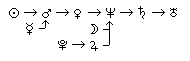
For example, Pluto in Sagittarius is disposited by its ruler - Jupiter; Jupiter in Pisces is disposited by its ruler - Neptune; Neptune in Capricorn is disposited by Saturn, and so on. The settings on the Chart Settings - Rulers tab are used to determine chains of disposition. - Chain of Detriment
This option is similar to the chain of disposition, but utilizes detriments set on the Rulers tab. - Delimiters
Inserts horizontal rules between the information blocks at right of the tableau. The rules can be repositioned, and the information blocks individually scrolled up and down. If an information block has more data than is visible, this is indicated by small vertical arrows adjacent the upper and/or lower delimiter.
To move the delimiters, click and drag a rule with the mouse, or use the keys:
- Ctrl+Up, Ctrl+Dn to select a delimiter (indicated by a bullet point),
- Shift+Up, Shift+Dn to move the selected delimiter.
If an upper rule is hidden (e.g. by another information block, or under the screen border), it can be diaplayed by using the Default delimiters option of the Chart tableau popup menu.
To scroll an information block, drag the information block with the mouse, or use the keys:
- Ctrl+Up, Ctrl+Dn to select delimiter (indicated by a bullet point),
- Up, Dn to scroll the block above the selected rule. - Aspect Table
Displays for Aspect Table to leftmost bottom corner of main window (printing out with a chart).