Constellations
The Constellations window can be used to search for astronomical constellations on the Sky tableau.
The Constellations window is opened by selecting "Tables" from the main menu or
by clicking the  "Tables" Toolbar,
then selecting the "Constellations" menu option.
"Tables" Toolbar,
then selecting the "Constellations" menu option.
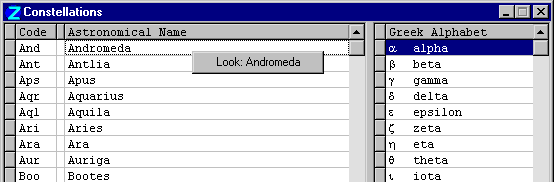
The left pane lists the 88 astronomical constellations, their standard abbreviations, and their Latin names. The right pane lists the Greek alphabet used to designate stars within a constellations in approximate order of brightness.
Right-click the mouse in the table for a popup menu with one choice: "View...". If the menu item is enabled, it indicates that the constellation has a picture which can be displayed by selecting the menu item.
Double-click the mouse button in the left (gray) cell of the table to locate a constellation on the Sky tableaux - the constellation to be searched for is marked with a » (chevron) in the Constellations table; double-click the chevron to deselect it. In the Sky tableau, the constellation is displayed as the only constellation whose stars are visible. (NOTE: the Sky tableau settings should have "Stars" checked, and "Hipparcos Star Catalog" unchecked). Only one constellation can be searched for at a time.